
Meetup: Social Events & Groups
MeetupSocial
3.819.91K Reviews
- Version
- 2026.10.26.3095
- Installs
- 10.00M
- Age Rating
- Teen
Screenshots




Our Review of Meetup: Social Events & Groups
 Analysis by Appyee
If you’re like me and always on the lookout for fun activities or new social circles, then Meetup: Social Events & Groups might just become your new best friend. I’ve spent some time exploring this app, and let me tell you, it’s like a treasure trove of opportunities for connecting with people who share your passions. Whether you’re into knitting, hiking, tech meetups, or just grabbing coffee with new friends, there’s something here for everyone. Let’s dive in!
Where it fits in a crowded social-app world
What makes Meetup feel different from the social apps I normally use is its focus on getting people together around an activity, rather than keeping a conversation going on a screen. It is a social app from Meetup, and that emphasis suits anyone who would rather have a reason to meet than send a stream of introductory messages. The app is free to download, though it includes optional in-app purchases; I’d explore the local groups first before deciding whether any paid option is relevant to me.
That focus is also a trade-off. A neighborhood group chat or a general social network can be better for quick questions, casual updates, or keeping up with people I already know. Meetup makes more sense when I want to find an organized gathering and am willing to show up. The experience depends heavily on what is happening near me, so the same app can feel lively in one area and sparse in another.
Discovering New Interests
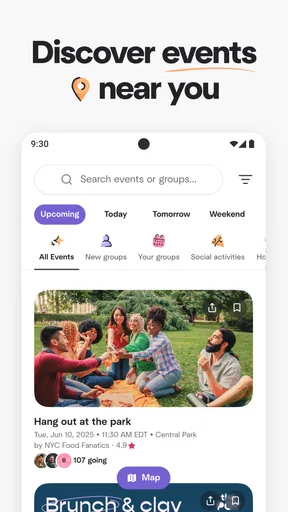
The first thing that struck me about Meetup is its sheer diversity. Upon opening the app, you’re greeted with a colorful array of categories and events. You can browse through various interests, from arts and culture to health and wellness. I was pleasantly surprised by the number of niche groups available. Ever wanted to join a medieval sword fighting class? Or perhaps a cheese tasting group? You’ll find it here!
What’s really cool is that you can filter events by location, date, and even specific keywords. So, if you’re planning a trip to another city, you can line up some local gatherings in advance. It’s a clever way to make the most out of your travels and meet locals who can show you around.
Making the search work for you
I find it useful to treat browsing as a small decision-making process, rather than joining the first group whose name sounds appealing. A group description and its upcoming events can help me tell whether it is active in a way that matches my schedule and interests. I would look for a specific event I genuinely want to attend, then use that as a better test of fit than a broad label such as “outdoors” or “technology.”
Filters are especially useful when I have a practical constraint. If I only have a free evening, narrowing by date is more helpful than scrolling through every possible interest. When I’m away from home, searching by location can turn an unfamiliar city into a chance to join a structured activity. Still, I’d check the event details before building a day around it; finding a group is a starting point, not a guarantee that its schedule will suit me.
Getting Started
Signing up is a breeze. You can create an account using your email or sync it with your social media profiles. Once you’re in, the app prompts you to select your interests. This helps tailor your home feed with events that are right up your alley. I appreciated how intuitive the interface is; even if you’re not tech-savvy, you’ll find your way around easily.
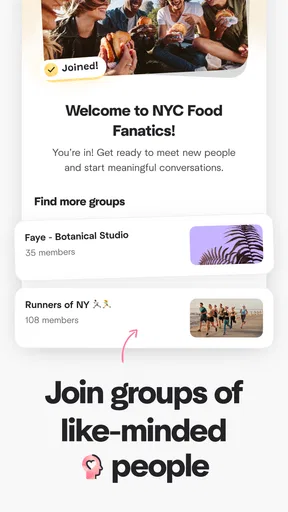
After setting up, you can join groups that catch your eye. Each group has its own page with a description, upcoming events, and a list of members. It’s a bit like joining a club, and you instantly feel like part of a community. You can even start your own group if you have a novel idea!
Choosing a first event without overcommitting
For a first visit, I’d pick one event that has a clear activity and an organizer I can contact, rather than signing up for several groups at once. That keeps the commitment manageable and gives me a concrete way to decide whether I like the format. I’d also make a note of the time and location before leaving home, and check for any event-specific instructions in the group’s information.
Starting a group is a different kind of commitment from joining one. It can be a good fit if I have a recurring interest and want to bring people together, but it also means taking responsibility for making the plan understandable and welcoming. If I only want to attend occasionally, joining an existing group is the simpler route.
Making Connections
One of the standout features of Meetup is the way it fosters genuine connections. The app encourages real-world interactions, which is refreshing in our digital age. You can RSVP to events and see who else is attending. It’s reassuring to know who you’ll be sharing space with, and it makes for a more comfortable introduction when you actually meet.
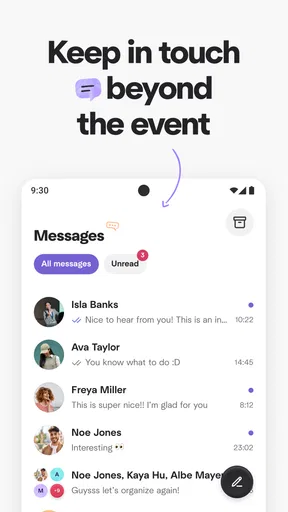
Communicating with other members is straightforward. You can message group organizers or participants directly through the app. This is perfect for coordinating carpooling to an event or just breaking the ice before you meet in person.
A realistic way to use it during the week
Imagine I’ve moved to a new neighborhood and want to meet people without turning every evening into a social commitment. I could browse for a local activity that already interests me, choose one event that fits my week, and RSVP. Before going, I might message the organizer to ask a practical question or introduce myself briefly. At the event, the shared activity gives us something to talk about, which can feel easier than walking into an unstructured social gathering.
Afterward, I can decide whether I want to return, try a different group, or simply keep the experience as a one-off. That flexibility is one of the app’s more useful qualities: joining an event does not have to mean making a new social circle your whole routine. On the other hand, if an event is cancelled or the group is quiet, I may need to try another option rather than expect one search to solve the problem.
Safety and Community
Now, I know what you might be thinking—meeting strangers can be a bit daunting. But rest assured, Meetup takes safety seriously. The app has built-in reporting features and guidelines to ensure a respectful environment. Plus, each group is moderated, so any inappropriate behavior is quickly addressed.
In addition to safety, the app promotes inclusivity. Many groups are dedicated to providing safe spaces for marginalized communities, ensuring everyone feels welcome. It’s a heartwarming aspect that adds to the app’s appeal.
Practical boundaries and expectations
Even with reporting and group moderation, I would still use ordinary judgment when meeting people I don’t know. I’d read the event information carefully, keep the first meetup in a setting that feels comfortable, and avoid sharing personal details before I’m ready. App tools can support a respectful community, but they cannot guarantee that every attendee or event will be a good fit.
It also helps to remember that RSVP interest and a real conversation are different things. Seeing other attendees can make an event feel less intimidating, but I wouldn’t assume that everyone will arrive or that the group’s atmosphere will match its description perfectly. A little flexibility makes the experience more enjoyable.
Who is likely to get the most from it?
I’d recommend Meetup to someone who has moved, wants to explore a hobby with other people, or is tired of relying on chance to make new connections. It can also suit travelers who want a planned local activity instead of only visiting places alone. The strongest match is someone willing to try an event, speak to a few people, and accept that finding the right group may take more than one attempt.
I would skip it if I wanted a guaranteed stream of one-to-one matches, instant replies, or a purely online community. It is also less compelling if there are few active groups within a comfortable distance or if my schedule rarely allows me to attend events. In those cases, a local community forum or a messaging group may be more practical, while a dedicated dating or professional-networking service is a better choice for those specific goals.
How to judge whether the community is active
Before investing much time, I’d compare the group’s upcoming events with its stated interests and my availability. A group page with a clear description and events I can realistically attend is more useful than a long list of members alone. I’d also consider whether the organizer’s messages answer the questions I need answered. These checks don’t remove uncertainty, but they help me choose a first meetup with a sensible expectation.
Meetup has been around since April 14, 2011, and its current version is 2026.08.24.3021. It has a 3.9 average from around 235,000 ratings, with more than 10 million installs. Those figures suggest a widely used service, but they don’t tell me whether a particular local group is active; the nearby event calendar is the detail that matters most for deciding whether it will work for me.
Final Thoughts
All in all, Meetup: Social Events & Groups is a fantastic app for anyone looking to expand their social circle and explore new interests. It’s like having a social planner in your pocket. The app is well-designed, easy to navigate, and offers a plethora of opportunities to meet like-minded individuals. Whether you’re an introvert looking to step out of your comfort zone or an extrovert seeking new adventures, you’ll find your tribe here.
So, what are you waiting for? Give Meetup a try and dive into a world of endless possibilities. Who knows, your next great friend or unforgettable experience might be just a click away!
My recommendation is enthusiastic but local-first: browse what is actually happening near you, choose one event that feels comfortable, and judge the app by that experience rather than by its broad promise. With a Teen content rating and a minimum OS of 7.0, it is aimed at a wide range of users, though younger users should still make sensible choices about attending events and sharing information. If you want real-world activities built around shared interests, Meetup is worth trying; if you need a predictable social experience on demand, I’d look elsewhere.
Privacy and Permissions
See what permissions an app requests and how it handles your data.
- Identity
- find accounts on the device, add or remove accounts
- Calendar
- read calendar events plus confidential information, add or modify calendar events and send email to guests without owners' knowledge
- Contacts
- find accounts on the device
- Location
- approximate location (network-based), precise location (GPS and network-based)
- Photos/Media/Files
- read the contents of your USB storage, modify or delete the contents of your USB storage
- Storage
- read the contents of your USB storage, modify or delete the contents of your USB storage
- Camera
- take pictures and videos
- Wi-Fi connection information
- view Wi-Fi connections
- Other
- view network connections, create accounts and set passwords, full network access, use accounts on the device, control vibration, prevent device from sleeping, Google Play license check, read Google service configuration
Verdict
Strengths of Meetup: Social Events & Groups
- User-friendly interface enhances navigation.
- Wide variety of interest-based groups.
- Easy event creation and management.
- Location-based event suggestions.
- Strong community engagement opportunities.
Limitations of Meetup: Social Events & Groups
- Limited offline functionality.
- Some events may have fees.
- In-app ads can be distracting.
- Occasional app performance issues.
- Privacy concerns with location tracking.
Similar Picks in This Category
View All
Meta Platforms, Inc.4.6

Instagram4.0

Likee-Live, Chat & Party Games
Likeme Pte. Ltd.4.4

Facebook Lite
Meta Platforms, Inc.4.5

TikTok - Videos, Shop & LIVE
TikTok Pte. Ltd.4.0

Moj: Free Short Drama & Reels
ShareChat4.1
Frequently Asked Questions
What is Meetup and how does it work?
Meetup is a social networking app designed to connect people with shared interests. Users can join or create groups centered around hobbies, professions, or activities. The app facilitates the organization of events where members can meet in person, fostering community building and networking opportunities.
Is Meetup free to use?
Meetup offers a free tier for users to join groups and attend events. However, organizing a group requires a paid subscription. This fee allows hosts to manage event logistics, communicate with members, and access additional features. The cost varies by region and subscription plan.
How can I find events or groups that match my interests?
Upon signing up, Meetup allows users to select interests, which helps tailor the suggestions for groups and events. The app’s search function can also be used to find specific topics or browse by categories. Location filters ensure events are accessible and relevant.
Is Meetup safe to use for in-person events?
Meetup prioritizes user safety by providing resources and guidelines for organizing and attending events. Users are encouraged to meet in public places and to read reviews of groups. Additionally, the platform allows reporting of inappropriate behavior to ensure community standards are maintained.
Can I use Meetup to network professionally?
Yes, Meetup is a great platform for professional networking. Many groups focus on career development, industry-specific meetups, and skill-sharing workshops. These events provide opportunities to connect with peers, learn new skills, and potentially find job opportunities or collaborations.
